Toddler Piano and Music Games
- 4.2
- Rating
- 10.00M
- Installs
- Free
- Price
 Analysis by App-foxy
When I tried Toddler Piano, I quickly understood that its main appeal is not teaching formal piano technique. It turns a phone or tablet into an approachable musical toy where a child can tap keys, hear notes, and explore songs without needing to read instructions. That simple capability is also the reason I would recommend it selectively: it works best as a gentle first contact with music, not as a replacement for lessons or a full digital instrument.
This is a free music game for children from Toy Tap LLP, with an Everyone content rating. It has reached over 10 million installs and holds a 4.5 average from around 6.2 thousand ratings, which gives a useful picture of its broad appeal. The app is currently at version 7.3, supports Android 7.0 and later, and includes optional purchases ranging from $1.99 to $4.99 per item.
Why the baby piano idea works so well for young children
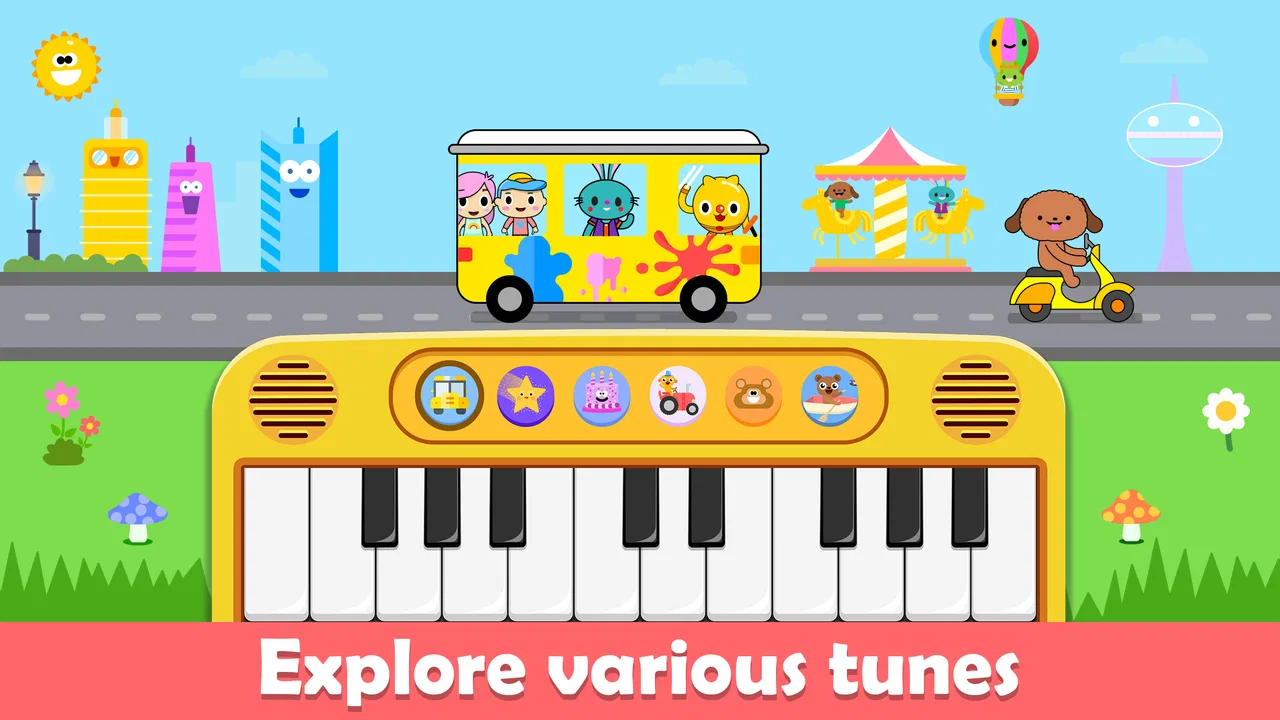
The central capability is immediate sound feedback. A child touches the on-screen piano and gets a musical response right away. There is no need to understand a menu, choose a complicated instrument, or wait for a lesson to begin. That short path between action and sound matters because young children usually learn through repetition and reaction rather than through explanations.
You May Also Like

 Blood Strike: 2.5 Anniversary
Blood Strike’s Loadouts Turn Every Drop Into a Tactical Gamble
A close look at Blood Strike’s custom loadouts: how fast access to signature weapons reshapes its battle royale rhythm, rewards preparation, and narrows the gap between fights.

 Pandora - Music & Podcasts
Pandora’s Music Is Easy to Start, but Harder to Recover
Pandora’s strength is its low-effort path from a seed to a station. Its weak spot is how much confidence it asks you to place in connection, setup, and quiet recovery.

 8 Ball Pool
 Is Built on Rivalries, Rematches, and Routine
A close look at the rivalries, rematches, shared routines, and unanswered safety questions that turn a quick pool match into a persistent mobile community.

 Samsung Music
’s Quiet Strength Is Playing What You Already Own
Its reach comes less from spectacle than from dependable access to a personal library. That simplicity is both the app’s strongest retention engine and its ceiling.

 AccuWeather: Weather Radar
AccuWeather Review: A Quick, Clear Forecast for Everyday Decisions
For everyday plans, the best forecast is the one you can understand quickly. AccuWeather makes rain timing, radar, and local conditions easy to act on, with a few trade-offs.

 Hill Climb Racing
Why Hill Climb Racing Still Turns Crashes Into One More Run
A tiny car, a bumpy hill and one more upgrade: Hill Climb Racing keeps resurfacing because its simple chaos makes every near-miss feel personal.
More From Our News Desk



In my experience, the strongest part of the design is how low the pressure feels. A wrong note is not treated like a failure, and a child can keep experimenting without being judged. That makes the game suitable for a first introduction to rhythm and pitch, especially for children who are curious about a parent’s keyboard but are not ready for a real instrument.
The piano format also gives parents an easy way to start a shared activity. Instead of handing over a game based on racing, collecting or competition, you can sit beside a child and ask them to find a sound, repeat a short pattern or accompany a familiar song. The app becomes more valuable when an adult turns tapping into conversation: “Was that sound high or low?” or “Can you play the same key again?”
The practical strength is instant musical feedback, not advanced instruction. That distinction is important before downloading it. Someone looking for finger exercises, staff notation, recording tools or a structured piano course will probably find this too limited. Someone looking for a safe, uncomplicated way to let a toddler explore sound may find the simplicity exactly right.
What playing feels like in everyday use
The most natural session is short and spontaneous. A child may pick up the device while waiting for dinner, sit beside a parent during a quiet afternoon, or try a few taps before bedtime. The app suits these small moments because it does not demand a long commitment. A few minutes can be enough to create a playful musical exchange.
One realistic routine is to use it after singing a nursery song together. I would sing a line, let the child tap freely, and then encourage them to choose a note at the end of the next line. This does not turn the game into a formal lesson, but it gives the tapping a purpose. The child starts listening for changes instead of simply touching the screen at random.
Another useful approach is to make the screen a shared instrument rather than a babysitter. I would keep the device within reach, sit nearby, and respond to what the child plays. If the child repeats one key, I might copy the same sound with my voice or clap a steady pulse. That small interaction helps the app support attention and turn-taking instead of becoming background noise.
Parents should also think about the physical setting. A tablet is easier for a young child to see than a small phone, while a phone is more convenient for a brief supervised activity. In either case, a sturdy grip and a clear surface are sensible because enthusiastic tapping can quickly become energetic handling. The game is simple, but the device remains a real piece of electronics in a small child’s hands.
How the musical interaction helps, and where it stops
Every tap creates an opportunity to notice cause and effect. The child acts, hears a note and decides whether to repeat it or try something else. That loop can encourage curiosity and listening. It may also help a child become comfortable with the idea that music comes from deliberate choices rather than from a passive video.
Still, I would avoid presenting the experience as a complete music education. Free exploration can introduce basic ideas such as higher and lower sounds, repetition and simple patterns, but it does not automatically teach posture, timing discipline or correct technique. Those goals need an instrument, guidance and a more structured method.
This is where the app compares favorably with ordinary children’s videos but less favorably with dedicated learning software. A video can hold attention, yet it usually leaves the child watching. Toddler Piano invites a physical response. On the other hand, a proper piano-learning app will generally offer clearer progression and practice goals. The choice depends on whether the immediate priority is exploration or instruction.
I also see a difference between this and a real toy keyboard. A physical keyboard offers tactile resistance and a more natural sense of space, while the app is easier to carry and less expensive to add to a device already at home. The screen version is therefore convenient, but it cannot reproduce the physical experience of pressing real keys.
The best scenario: a short, supervised music break
The ideal user is a preschool-age child who enjoys tapping, singing and trying new sounds, with an adult close enough to guide the activity. I would use it as a short transition between activities rather than as an all-day distraction. For example, after returning home, a child could spend a few minutes playing while a parent prepares a snack, followed by a quick shared song.
That scenario works because the app gives the child something active to do without requiring a complicated setup. It can also be useful during travel or while waiting in a quiet place, provided the sound level is appropriate for the surroundings. Headphones may not be a good choice for very young children unless an adult is supervising closely, so keeping the volume modest is the more comfortable approach.
The game can also fit a family music routine. A parent might choose one simple song for the week and invite the child to experiment with notes during the chorus. The goal is not to reproduce the melody perfectly. The goal is to make listening and participation feel enjoyable. This kind of routine gives the app more depth than isolated tapping, even though the underlying interaction remains simple.
For an educator or childcare worker, the app could serve as a brief demonstration tool when introducing the idea of a piano. It is easier to pass around than a full instrument, and children can take turns hearing the result of a tap. However, shared-device use requires attention to hygiene, accidental exits and the possibility that several children will want control at once. It is better suited to a small, calm activity than to an unsupervised group.
Trade-offs parents should understand before installing
The first trade-off is simplicity versus depth. The uncluttered musical toy is approachable precisely because it does not ask a child to master a large system. That makes the first session easy, but it also means the experience may feel repetitive once the novelty of tapping wears off. Children who already want challenges, goals or measurable progress may outgrow it quickly.
The second trade-off concerns in-app purchases. The game is free to download, while optional items cost between $1.99 and $4.99 each. I would check the purchase controls before handing the device to a child, particularly if the device is shared with other family members. A free starting point is useful, but parents should still treat the app like any other product with paid extras.
The third trade-off is the difference between independent play and meaningful learning. A child can use the app alone, but the musical benefit is stronger when an adult occasionally joins in. Without that interaction, the experience may become rapid tapping with little listening. This is not a defect unique to the game; it is simply a reminder that a responsive adult can turn a basic activity into a richer one.
There is also the question of screen time. Because the game is calm and creative, it may feel preferable to some louder entertainment, but it is still screen use. I would set a clear stopping point and avoid using it as the automatic answer to boredom. A short session followed by singing, clapping or playing a real instrument creates a healthier balance than leaving the app open indefinitely.
Older children and serious beginners should probably choose something else. If the goal is to learn recognizable melodies step by step, read notes, practise rhythm with accuracy or build a routine around lessons, a dedicated educational piano app or a real keyboard will be a better investment. Toddler Piano is strongest before those expectations become central.
Small ways to get more from the basic piano
One technique I found useful is to limit the activity to a listening challenge. Instead of asking a child to play a song, I would ask them to make two sounds and decide which one seems higher. This keeps the task manageable and turns random tapping into focused attention. It is a small adjustment, but it makes the app feel more purposeful without pretending that it offers a formal lesson.
A second approach is to use imitation. I would tap a short pattern and invite the child to copy the rhythm, even if the notes are different. The child does not need to reproduce a complicated sequence. Repeating two or three taps is enough to practise memory and turn-taking. If the child loses interest, I would stop rather than push for accuracy; the game works best when curiosity remains voluntary.
A third tip is to connect the piano with movement. A parent can clap slowly while the child plays, then clap faster for a short moment and return to a calm pace. This helps the child notice that music has pulse, not just isolated sounds. The app itself remains simple, but the surrounding activity can introduce an idea that a generic tapping session would miss.
I would also rotate the role of the device. Sometimes the child can play while the adult sings; at other times the adult can tap while the child listens or moves. This prevents the experience from becoming a one-way screen habit. It also reveals whether the child is interested in the sound itself or only in controlling the display.
Who will gain the most from this game
Toddler Piano is a good match for families wanting an easy first musical activity, especially when a child shows interest in keys but is not ready for formal instruction. It is also useful for parents who need a portable option for short waiting periods and prefer something creative over a purely competitive game.
It may appeal to children who enjoy repetition, sound effects and open-ended discovery. A child does not need to understand music theory to begin, and the Everyone rating makes the intended audience clear. Even so, age suitability is not the same as independent suitability: very young users still benefit from an adult nearby, both for guidance and for sensible device handling.
The app is less convincing for families seeking a long-term learning path. If you want graded exercises, technical correction or a clear curriculum, I would look toward a dedicated piano tutor, a structured learning app or a real keyboard. If your child becomes frustrated by unstructured play, the lack of progression may also make this a poor fit.
Its broad reach and 4.5 average suggest that the basic idea connects with many users, but popularity should not decide the purchase by itself. The important question is what you want the child to do. If the answer is “explore sounds with very little friction,” this game makes sense. If the answer is “learn piano systematically,” choose a more specialized tool.
My recommendation after using it
I see this as a friendly musical starting point rather than a conventional game with levels to conquer. Its best feature is the immediate relationship between a child’s touch and a piano sound. That relationship is easy to understand, easy to share and flexible enough for short family activities.
I would install it for a young child who likes music and needs a simple, low-pressure way to experiment. I would introduce it with a parent-led song, a copying game or a listening question instead of expecting the app to teach everything on its own. I would also supervise purchases and keep sessions brief, especially when the device is shared.
For me, the final judgment is positive but specific: this is a useful musical toy, not a complete piano course. The free entry point, approachable interaction and child-friendly focus make it worth trying, while the limited depth means it should sit alongside singing, movement and real-world instruments. If that balance matches what you need, Toddler Piano is an easy recommendation for a first playful step into music.
FAQs for Toddler Piano and Music Games
01What features does Toddler Piano and Music Games offer?
Toddler Piano and Music Games provides a variety of interactive musical activities designed to engage young children. The app includes a virtual piano, colorful musical notes, and a selection of fun, educational games that introduce basic music concepts. It also offers songs and sound effects to encourage creativity and exploration.
02Is Toddler Piano and Music Games safe for my child?
Yes, Toddler Piano and Music Games is designed with child safety in mind. The app features a simple, user-friendly interface and contains no ads or in-app purchases that can be accessed by children. Parents can rest assured that their child will have a safe and enjoyable experience within the app.
03Can Toddler Piano and Music Games be used offline?
Yes, Toddler Piano and Music Games can be used offline, allowing children to play and learn without the need for an internet connection. This makes it perfect for travel or situations where Wi-Fi or data may not be available. All features remain accessible offline, ensuring uninterrupted playtime.
04What age group is Toddler Piano and Music Games suitable for?
Toddler Piano and Music Games is designed for young children, typically aged 2 to 5 years old. The app's activities are crafted to be age-appropriate, focusing on developing basic musical skills and encouraging early learning through interactive play. It's an ideal introduction to music for toddlers.
05How does Toddler Piano and Music Games support learning and development?
The app supports learning and development by introducing children to fundamental music concepts through play. It helps improve fine motor skills, auditory recognition, and hand-eye coordination. Additionally, the app encourages creative expression and cognitive development, making it a valuable educational tool for young learners.
Pros
- Engaging and colorful interface.
- Wide variety of musical instruments.
- Easy to navigate for toddlers.
- Encourages creativity and learning.
- No in-app purchases for safety.
Cons
- Limited song library available.
- Requires internet for updates.
- Ads can be distracting.
- No parental control options.
- Battery drain on older devices.

Toddler Piano and Music Games
Gallery